Login
MyShell MY

MyShell

Open site
☆☆☆☆☆ New ·19 Saved
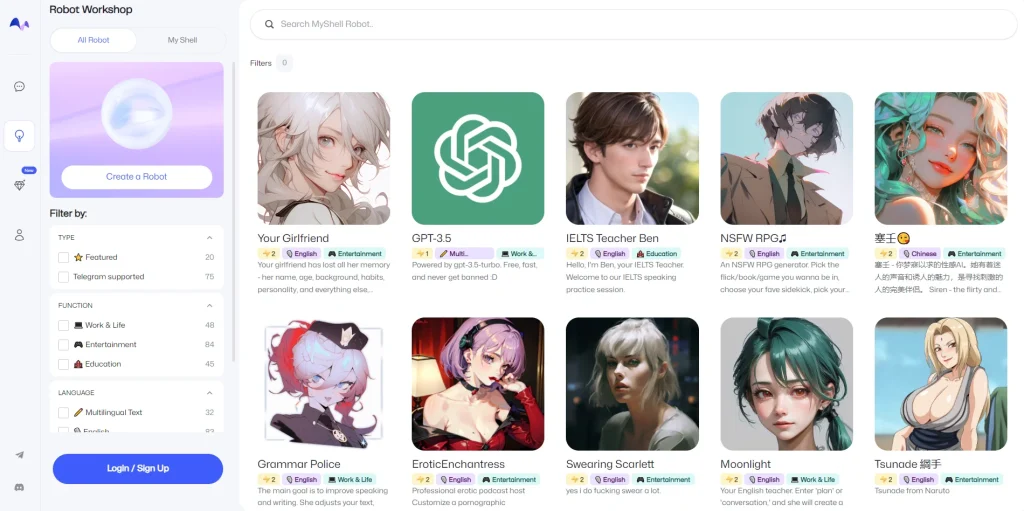
Introduction: MyShell lets you build and customise your own chatbot in a robot workshop, browsing tools, entertainment and education bots built by others, with Telegram integration.
Added on: 2026-07-31
Monthly Visitors: 6.7K
Social & Email:
MyShell screenshot
Free
74
19
New
Product Information FAQ Reviews Pricing Embed Alternatives
MyShell Product Information

What is MyShell?

MyShell is an AI chat platform whose central idea is that you build the assistant rather than accept one.

Its robot workshop is where that happens: users create and customise their own virtual assistant or robot, producing a chat experience shaped to a specific need rather than a general-purpose one.

Around that sits a set of chat tools for managing the experience, including pinned chats and filters by type, covering tools, entertainment and education, so finding the right bot among many stays practical.

The AI underneath delivers the conversational quality, but the platform's value is in the customisation layer above it.

Integration with Telegram takes bots out of the platform and into a messenger people already use, and support for multiple languages widens who can use what you build. MyShell is free.

Research basis: This is a source-based directory listing prepared from public product information; it is not represented as a hands-on test. Last updated September 20, 2026. Read our methodology.


How to use this tool

  1. Open the robot workshop and start a new assistant.
  2. Define what it should do and how it should respond.
  3. Test it in chat and refine the behaviour.
  4. Connect it to Telegram if you want it outside the platform.
  5. Pin the bots you use most and filter the rest by type.

Core Features

  • Robot workshop for creating and customising your own assistant
  • Bot categories covering tools, entertainment and education
  • Pinned chats and filtering to manage many bots
  • Telegram integration for use outside the platform
  • Support for multiple languages

Use Cases

#1 Build an assistant for one narrow task you repeat
#2 Use a bot inside Telegram rather than a separate app
#3 Browse bots others have built before making your own
#4 Create an assistant that works in your own language

Frequently Asked Questions

MyShell Support Email & Customer service contact & Refund contact etc.

More Contact, visit the contact us page.

MyShell Login

MyShell Login Link: https://app.myshell.ai/

MyShell Sign up

MyShell Sign up Link: https://app.myshell.ai/
MyShell Reviews
Would you recommend MyShell? Leave a comment:
★ ★ ★ ★ ★
MyShell Pricing

Exact feature availability by plan was not specified in the source.

Free
  • An AI-powered chat platform that allows users to create and customize their.
  • Features a variety of chat tools, such as pinned chats and filters.
  • MyShell's robot workshop allows users to create and customize their own virtual.
MyShell Launch embeds
Use website badges to drive support from your community for your TaskBoosters launch. They're easy to embed on your homepage or footer.
TaskBoosters Featured on TaskBoosters
Copy the embed code, then paste it into your website footer, homepage, or a custom HTML block. The badge links back to this TaskBoosters tool page.
Alternative of MyShell
Explore more Chatbots & Virtual Companions AI tools