Login
InteriorAID IN

InteriorAID

Open site
☆☆☆☆☆ New ·11 Saved
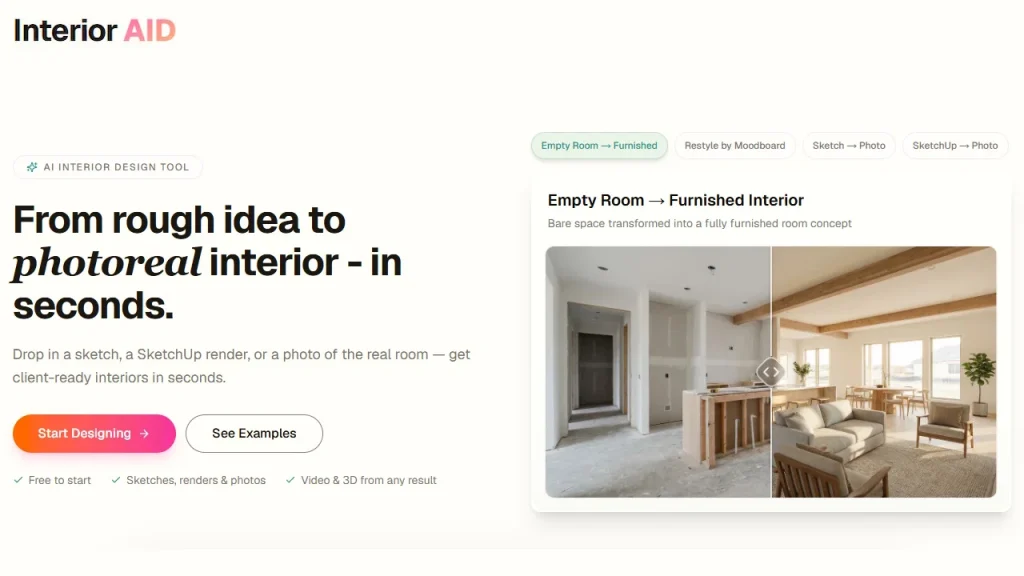
Introduction: InteriorAID turns sketches, renders and room photos into photorealistic interiors, explorable 3D scenes and walkthrough videos, with edits confined to selected areas.
Added on: 2026-08-01
Monthly Visitors: 1.2K
Social & Email:
InteriorAID screenshot
pl Poland
Freemium
137
11
New
Product Information FAQ Reviews Pricing Embed Alternatives
InteriorAID Product Information

What is InteriorAID?

InteriorAID transforms sketches, renders and room photographs into photorealistic interiors, explorable 3D scenes and videos.

Its range covers the situations interior work actually presents: furnishing an empty room, restyling an existing one to a different aesthetic, and turning a moodboard into a styled room.

Editing is precise rather than wholesale. Modifications can be confined to selected areas of an image without disturbing the rest, which is what makes iteration on a single element possible.

Static images can be converted into walkthrough videos or interactive 3D scenes, so a concept can be experienced rather than only viewed.

Project Studio manages versions and outputs and allows continuing from a selected result, keeping a project in one organised space. It serves designers, architects, 3D visualisers, homeowners and renovators, speeding up ideation, style exploration and approval rounds, and letting room styles and furniture directions be tested before real decisions are made. Pricing starts at $8 per unit.

Research basis: This is a source-based directory listing prepared from public product information; it is not represented as a hands-on test. Last updated September 20, 2026. Read our methodology.


How to use this tool

  1. Upload the sketch, render or room photograph.
  2. Choose whether to furnish, restyle or work from a moodboard.
  3. Confine edits to the specific areas you want changed.
  4. Generate a walkthrough video or 3D scene from the result.
  5. Manage versions and continue from the best output in Project Studio.

Core Features

  • Photorealistic interiors from sketches, renders or room photos
  • Empty rooms furnished, existing rooms restyled
  • Moodboards turned into styled rooms
  • Edits confined to selected areas of an image
  • Walkthrough videos and interactive 3D scenes
  • Project Studio managing versions and outputs

Use Cases

#1 Show a client a furnished version of an empty room
#2 Test several styles before specifying anything
#3 Change one element of a render without redoing it
#4 Turn a still concept into a walkthrough for approval

Frequently Asked Questions

InteriorAID Support Email & Customer service contact & Refund contact etc.

More Contact, visit the contact us page.

InteriorAID Login

InteriorAID Login Link: https://interioraid.app/

InteriorAID Sign up

InteriorAID Sign up Link: https://interioraid.app/
InteriorAID Reviews
Would you recommend InteriorAID? Leave a comment:
★ ★ ★ ★ ★
InteriorAID Pricing

Exact feature availability by plan was not specified in the source.

Free Trial
  • An artificial intelligence-based interior design tool that enables users to transform sketches.
  • Its versatility and adaptability allow the user to convert empty rooms into.
  • InteriorAID enables precise modifications in select areas of an image, without affecting.
Paid Plan
$8/unit Pay-as-you-go
  • Also convert static images into walkthrough videos or interactive 3D scenes.
  • The tool's Project Studio assists in managing versions, outputs, along with continuing.
  • Aimed at designers, architects, 3D visualizers, homeowners, and renovators alike, InteriorAID is.
InteriorAID Launch embeds
Use website badges to drive support from your community for your TaskBoosters launch. They're easy to embed on your homepage or footer.
TaskBoosters Featured on TaskBoosters
Copy the embed code, then paste it into your website footer, homepage, or a custom HTML block. The badge links back to this TaskBoosters tool page.
Alternative of InteriorAID
Explore more Art & Creative Design AI tools
InteriorAID's Tags
3D Generation › Image Edit › image generation › Realism › Styling › video generation › Visual Creation ›