Login
Cursor CU
☆☆☆☆☆ New ·0 Saved
Introduction: Cursor is an AI-first code editor designed to help developers understand, edit, generate, and refactor code inside a full development environment. It combines familiar editor...
Added on: 2023-01-01
Monthly Visitors: 35M
Social & Email:
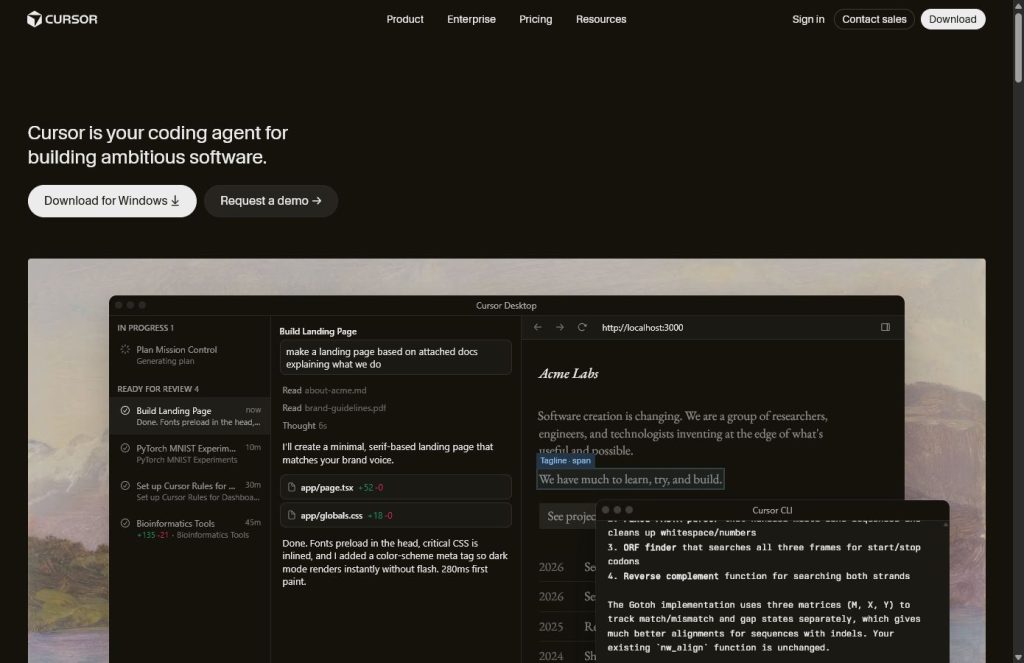
Cursor screenshot
us United States
Released 4 years ago
Freemium
67
0
New
Product Information FAQ Reviews Pricing Embed Alternatives
Cursor Product Information

What is Cursor?

Cursor is an AI-first code editor designed to help developers understand, edit, generate, and refactor code inside a full development environment. It combines familiar editor workflows with codebase-aware chat, inline edits, autocomplete, and agent-style coding features.

Before you choose Cursor

Start Cursor on a small repository task with a clear boundary: fix one failing test, explain a module, or refactor one function without changing behavior. Ask for a short plan before edits and review which files the agent changed. Run tests and inspect any command that installs packages, modifies data, or reaches an external service. The useful measure is the amount of verified work saved after review, not how many lines of code the agent generated. Keep a recoverable branch for experiments.

Compare with Aider if you prefer a terminal-centered workflow, or GitHub Copilot if your priority is assistance in an existing editor setup. Explore Aider.

Suggested evaluation, not a hands-on test result. Official product information. Editorial guidance updated September 3, 2026.

Research basis: This is a source-based directory listing prepared from public product information; it is not represented as a hands-on test. Last updated September 3, 2026. Read our methodology.


How to use this tool

Use Cursor by opening your project in the editor, indexing the codebase, and asking it to explain files, make edits, generate features, fix bugs, or refactor code. It works best when you scope the task clearly, mention the files or behavior involved, review every change, and run tests before accepting the result.

Core Features

  • AI code editor
  • Codebase chat
  • Inline edits
  • Autocomplete
  • Multi-file changes
  • Bug fixing support
  • Developer workflow shortcuts

Use Cases

#1 Understand large codebases
#2 Build features
#3 Fix bugs
#4 Refactor components
#5 Generate tests
#6 Navigate unfamiliar code
#7 Speed up development

Frequently Asked Questions

Cursor Prompts

Feature Build
Implement [feature] in this codebase. First explain the files you will touch, then make the smallest safe change.
Bug Fix
Find why [bug] happens, explain the cause, and suggest the smallest fix with tests.

Cursor Support Email & Customer service contact & Refund contact etc.

More Contact, visit the contact us page.

Cursor Company

Company name: Anysphere
Founded: 2023
More about Cursor, Please visit the about us page.

Cursor Login

Cursor Login Link: https://cursor.com

Cursor Sign up

Cursor Sign up Link: https://cursor.com

Cursor Pricing

Cursor Pricing Link: https://cursor.com/pricing
Cursor Reviews
Would you recommend Cursor? Leave a comment:
★ ★ ★ ★ ★
Cursor Pricing
Free
$0
  • Basic editor access
  • Limited AI usage
Pro
$20/month
  • Higher AI limits
  • Advanced models
  • Codebase workflows
Cursor Launch embeds
Use website badges to drive support from your community for your TaskBoosters launch. They're easy to embed on your homepage or footer.
TaskBoosters Featured on TaskBoosters
Copy the embed code, then paste it into your website footer, homepage, or a custom HTML block. The badge links back to this TaskBoosters tool page.
Alternative of Cursor
Explore more Coding & Development AI tools
Cursor's Tags
AI code editor › codebase chat › coding assistant › developer tools › IDE › programming ›